
When Price Moves Both Ways
Most bars are straightforward. An up bar makes a higher high and a higher low. A down bar makes a lower high and a lower low. The market picked a direction.
An outside bar is different. It makes both a higher high AND a lower low than the previous bar. The market moved in both directions, exceeding the prior bar's range on both ends.
This creates a problem for swing charts: which direction counts?
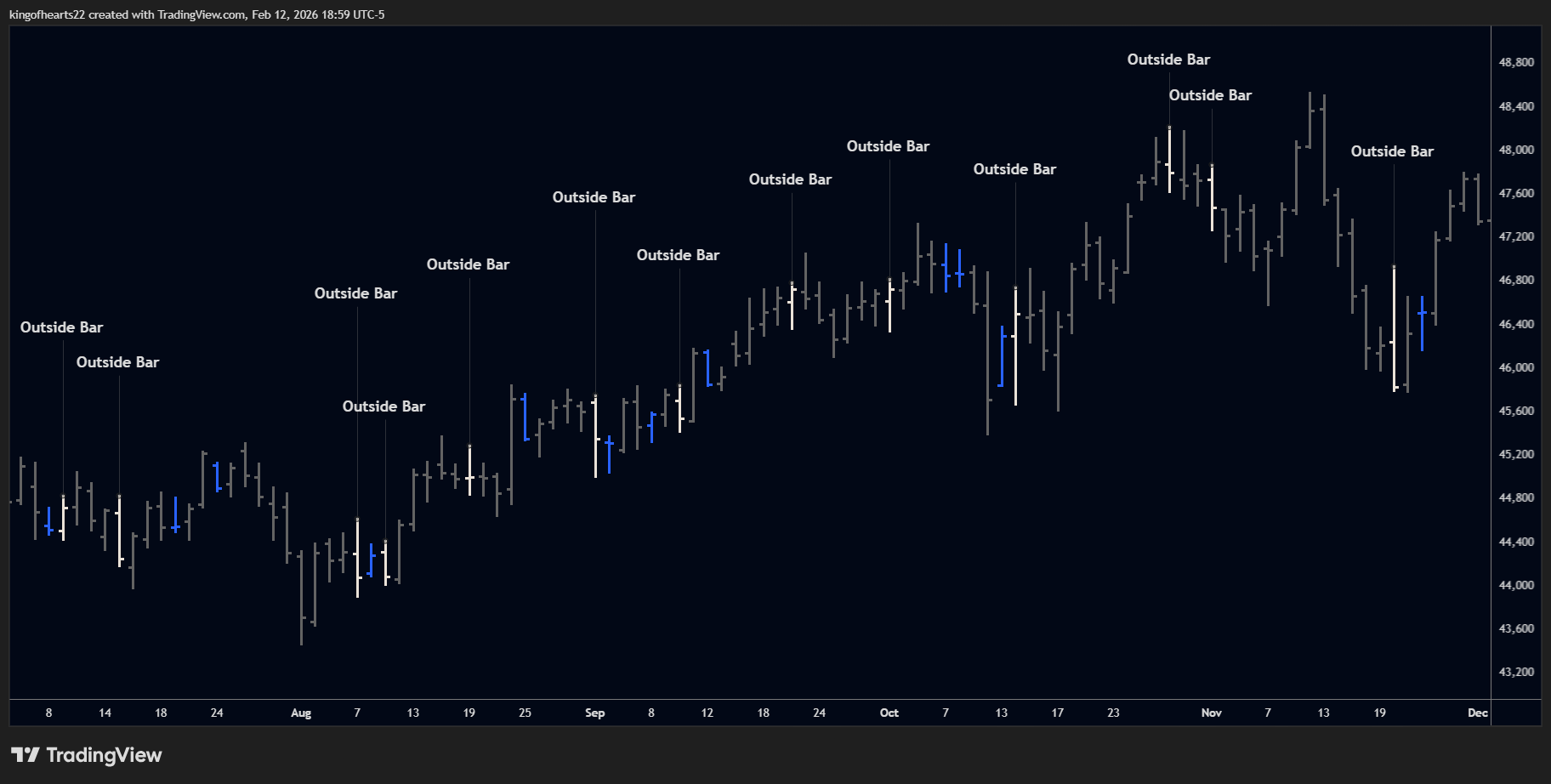 An outside bar exceeds the previous bar's range in both directions
What Outside Bars Represent
An outside bar on a daily chart is essentially a zigzag compressed into a single day.
If you zoomed into a 4-hour chart, that outside day would appear as a wave — price moved one direction, reversed, and moved the other direction, all within 24 hours. The daily bar captures the full amplitude but hides the sequence.
Swing charts need to represent this internal movement. The question is how to represent it.
The Three Resolution Modes
SSI PRO offers three ways to handle outside bars:
Mark as Continuation
The conservative, traditional approach.
When an outside bar appears during an uptrend and price continues up afterward, the indicator draws a zigzag pattern:
- Horizontal line from the bar before the outside bar
- Down to the outside bar's low
- Up to the continuing bar's high
This creates an intermediate swing at the outside bar's counter-trend extreme. It's safe, always produces valid alternation, and makes the outside bar's range visible.
Best for: Complete structural visibility, traditional swing charting
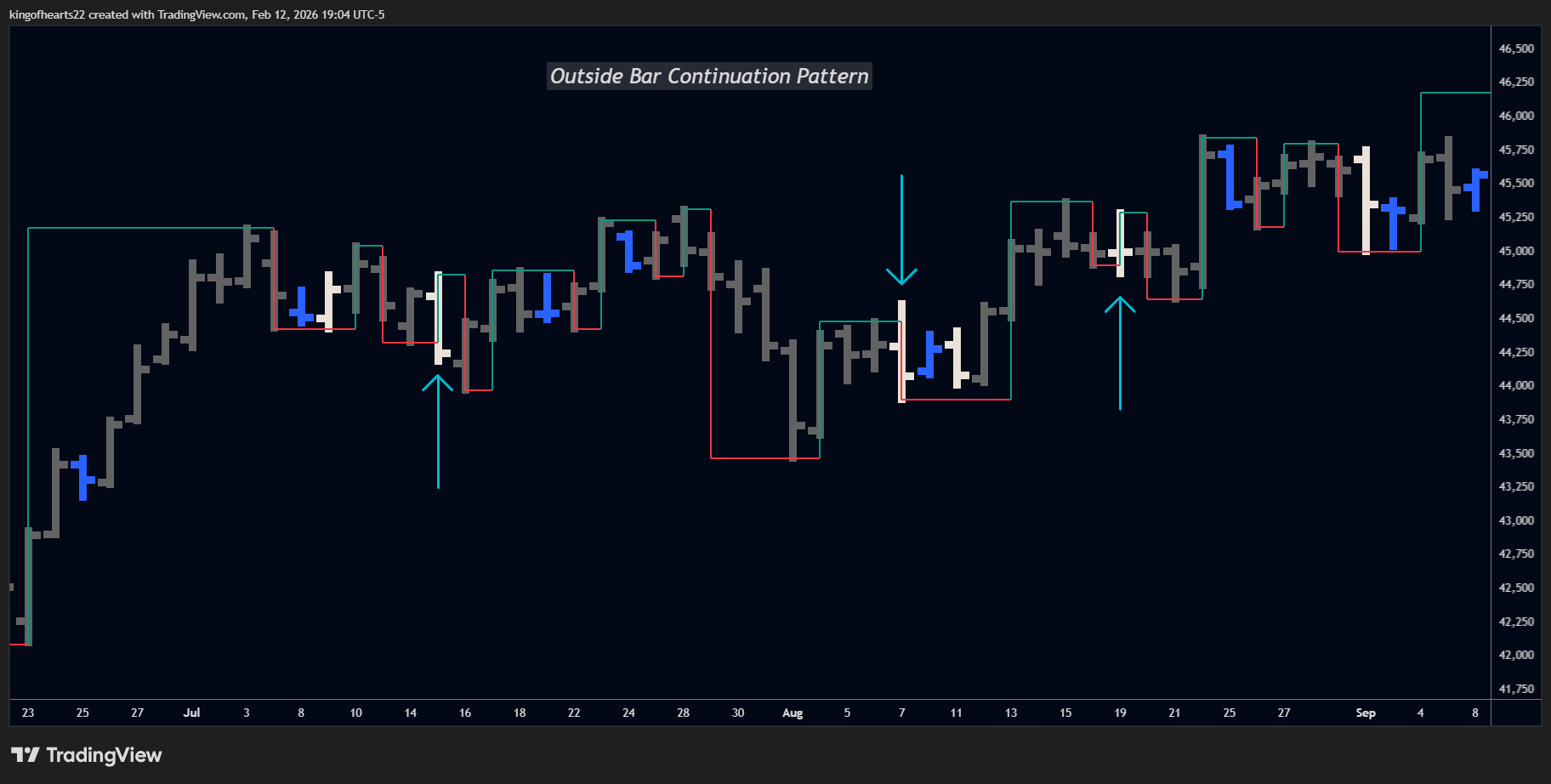 Mark as Continuation creates a zigzag to show the outside bar's counter-move.
Mark as Reversal
An intelligent alternative that places swing marks at outside bar extremes when structurally safe.
Not all outside bars are created equal. Some spike in the trend direction first, then dip against it. Others dip against the trend first, then spike with it. This chronological difference matters.
Trend-First Pattern:
- Market is rallying
- Outside bar spikes to new high FIRST
- Then dips to new low
- Continuation follows
In this case, marking the swing at the outside bar's high maintains proper alternation. The system does this automatically.
Counter-First Pattern:
- Market is rallying
- Outside bar dips to new low FIRST
- Then spikes to new high
- Continuation follows
Here, marking at the outside bar extreme would create consecutive same-direction labels (violating alternation). The system detects this and falls back to zigzag behavior automatically.
You don't need to understand the pattern detection — just know that "Mark as Reversal" intelligently chooses the best representation and falls back to safe behavior when needed.
Best for: Cleaner charts with intelligent pattern handling
Chronological Validation on Higher Timeframes
On Weekly, Monthly, Quarterly, and Yearly charts, SSI PRO has access to the exact dates when highs and lows occurred within each bar. This enables smarter "Mark as Reversal" behavior.
The Challenge: A yearly bar might show a high in December and a low in March. If the prior trend was UP, a valid reversal would have the HIGH occurring first (trend peaks), then the LOW (reversal begins). But if the LOW occurred first and price later made new highs, this isn't a reversal structure — it's continuation.
Automatic Detection: When you select "Mark as Reversal," the indicator checks the chronological order of extremes:
| Prior Trend | Valid for Reversal | Falls Back to Continuation |
|---|---|---|
| UP | High occurs before Low | Low occurs before High |
| DOWN | Low occurs before High | High occurs before Low |
If the chronological sequence doesn't support a reversal interpretation, the indicator automatically uses "Mark as Continuation" instead. This ensures your swing charts maintain logical time progression without manual intervention.
Which Timeframes:
- Daily and intraday: Always allows reversal (no sub-bar timestamp data)
- Weekly and higher: Validates chronological order automatically
Example: 2020 ES Yearly Bar
Consider the 2020 yearly bar on ES futures:
| Data Point | Value |
|---|---|
| Yearly HIGH | 3753 (December 31, 2020) |
| Yearly LOW | 2174 (March 23, 2020) |
| Prior Trend | UP |
What actually happened: The market crashed in March (making the yearly low), then recovered and made new highs by December.
Without chronological validation: "Mark as Reversal" would create swings showing HIGH (Dec) → LOW (Mar) — a sequence that goes backwards in time. Time metrics would show negative values or nonsensical ratios.
With chronological validation: The indicator detects that the LOW occurred before the HIGH. Since the prior trend was UP, a valid reversal requires HIGH first, then LOW. This pattern fails that test, so the indicator automatically uses "Mark as Continuation" instead — preserving accurate time progression and meaningful metrics.
This happens automatically. You select "Mark as Reversal," and the indicator makes the right choice based on the actual market structure within each bar.
This is particularly important for bars spanning major market events (like the 2020 COVID crash on yearly charts) where the internal sequence of extremes reveals the true market structure.
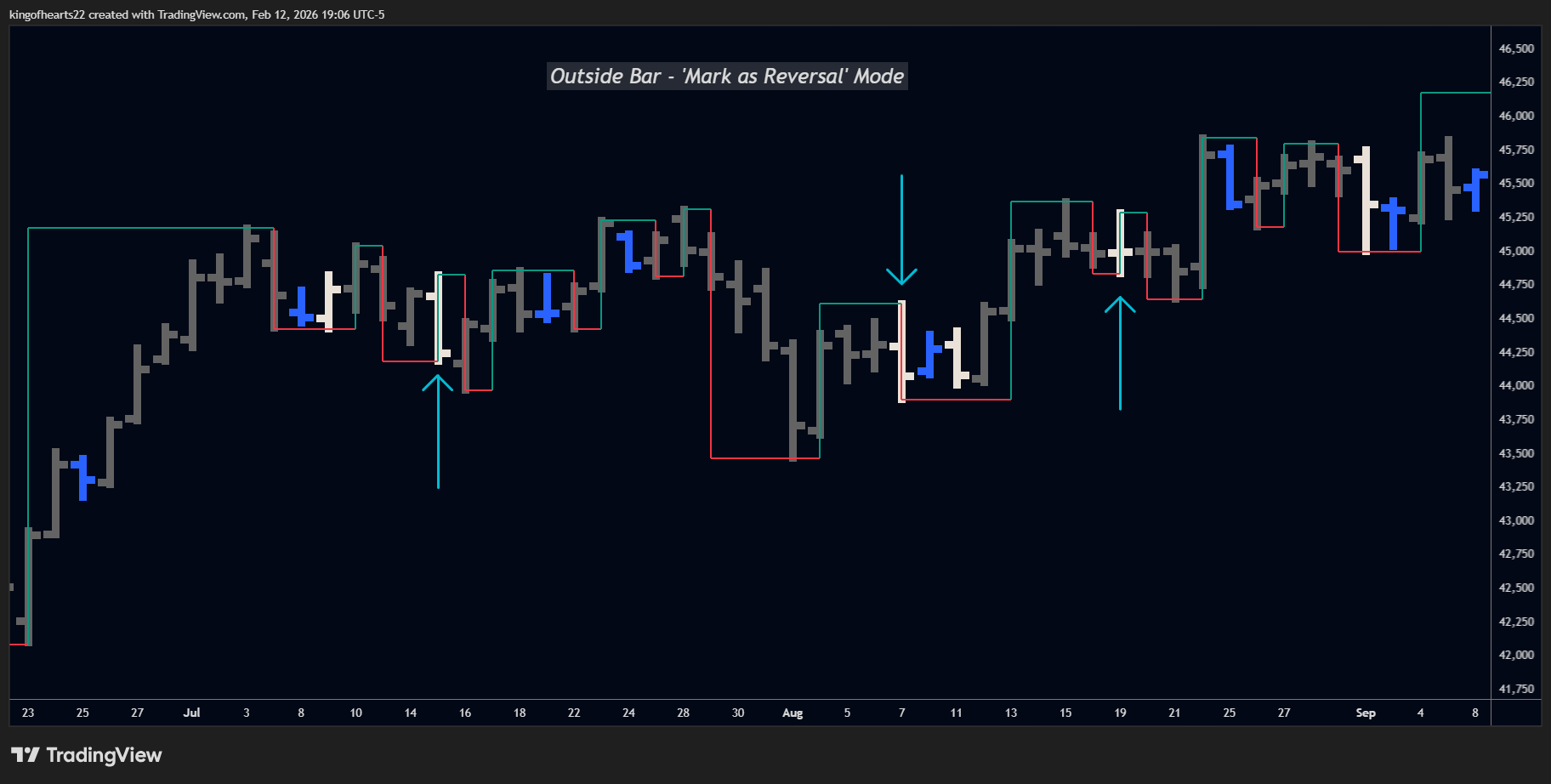 Mark as Reversal places swings at outside bar extremes when the pattern allows.
Skip Entirely
The minimalist approach.
When an outside bar appears and price continues in the prevailing direction, no intermediate swing is marked. The chart simply continues the existing swing as if the outside bar's counter-move didn't happen.
This produces the cleanest charts with the fewest swings, but you lose visibility into the outside bar's range.
Best for: Maximum simplicity, focusing only on major turns
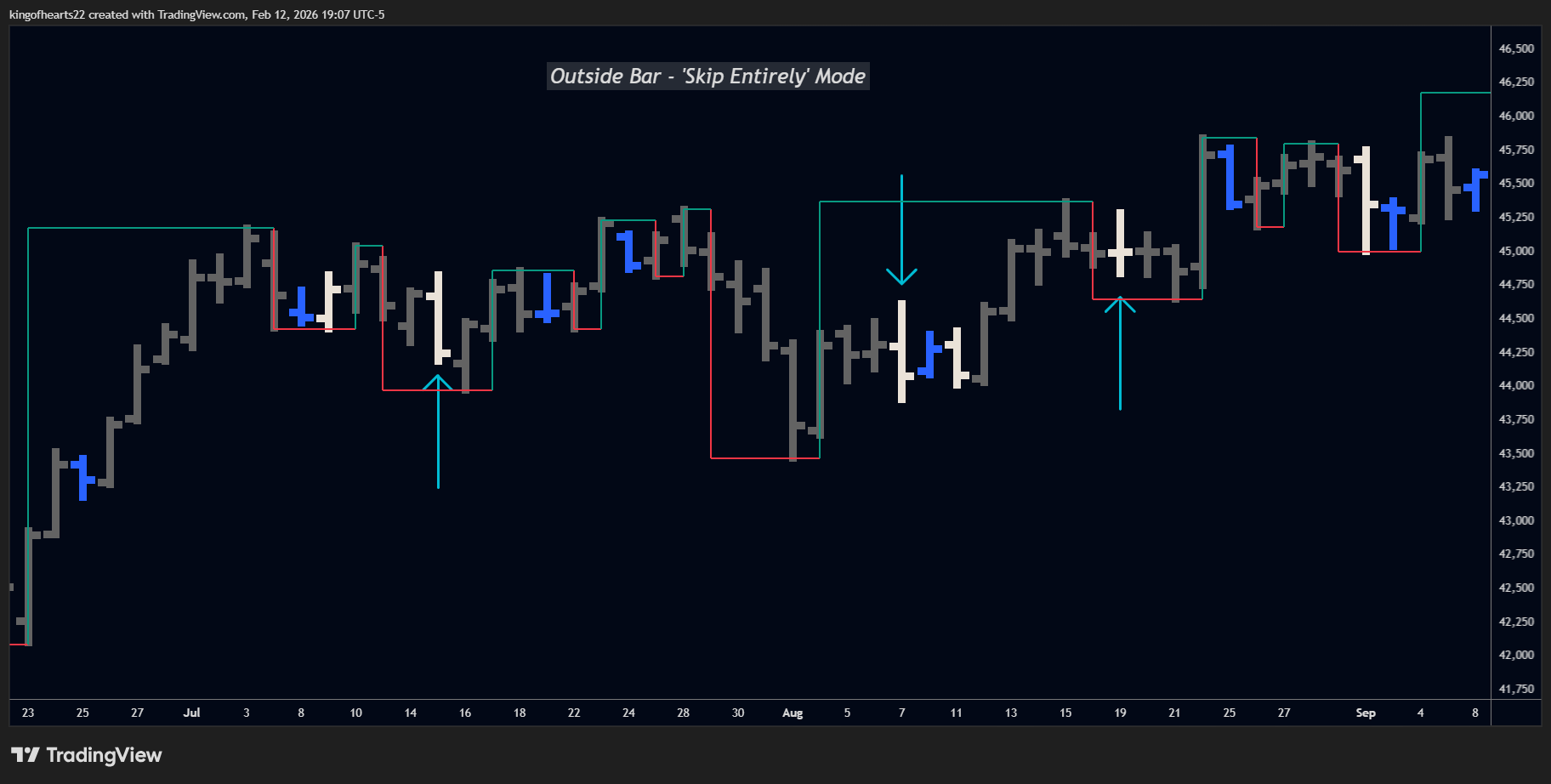 Skip Entirely omits the intermediate swing for a cleaner chart.
Choosing a Mode
| Mode | Swings Created | Best For |
|---|---|---|
| Mark as Continuation | 2 (zigzag) | Complete visibility, traditional analysis |
| Mark as Reversal | 2 (intelligent) | Balance of clarity and accuracy |
| Skip Entirely | 0 | Maximum simplicity |
All three modes produce valid swing structures. The difference is how much detail you want to see.
If you're unsure, start with Mark as Continuation — it's the safest default that shows everything.
Engulfing Mode
Outside bars handle situations where a single bar exceeds the prior bar's range. But what happens when a bar is so large that multiple subsequent bars fit inside its range?
This is an engulfing pattern.
What Engulfing Means
When a bar's range (high to low) contains multiple following bars, those contained bars are "engulfed." They're trapped inside invisible boundary lines set by the engulfing bar's extremes.
Until a subsequent bar breaks out of that range (penetrates the boundary), the swing chart treats the engulfed bars as undecided — similar to inside bars.
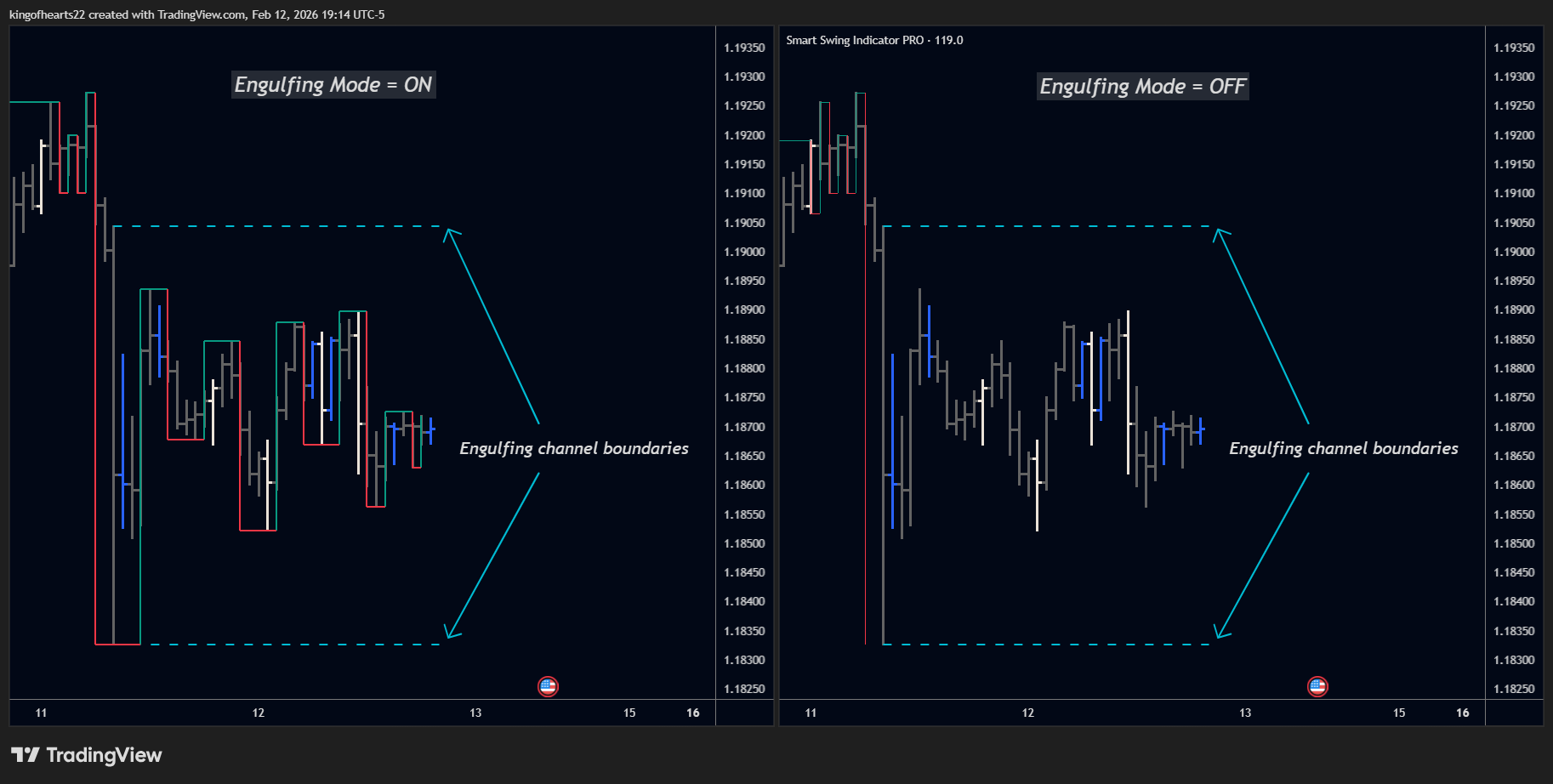 The engulfing bar's range contains four subsequent bars. The fifth bar penetrates the boundary.
The Engulfing Toggle
Setting Name: Enable Engulfing Logic
Options: On / Off
Default: On
When ON (Recommended):
- Large-range bars create engulfing conditions
- Bars within the engulfing range are tracked but don't trigger reversals
- Swing only reverses when a bar penetrates the engulfing boundary
- Produces cleaner swings through consolidation periods
When OFF:
- Allows early reversal when an opposite-direction bar appears inside the envelope
- Same-direction bars inside envelope behave identically to ON mode
- Useful when you want reversals to trigger on direction change, not boundary penetration
The Key Difference
Both modes track envelope boundaries. The difference is what triggers a reversal:
| Scenario | Engulfing ON | Engulfing OFF |
|---|---|---|
| Same-direction bars inside envelope | Wait for penetration | Wait for penetration |
| Opposite-direction bar inside envelope | Wait for penetration | Reversal triggers immediately |
| Bar penetrates envelope boundary | Reversal or continuation | Reversal or continuation |
In other words: ON and OFF behave identically until an opposite-direction bar appears inside the envelope. Only then does OFF allow an early reversal.
When to Disable Engulfing
Consider disabling if:
- You want reversals to trigger on direction change rather than boundary penetration
- You prefer more responsive swing detection inside large-range bars
- You're comparing to software that triggers reversals on direction change
Most users should leave Engulfing Logic on for cleaner charts and fewer false reversals during consolidation.
How Outside Bars and Engulfing Interact
Outside bars and engulfing patterns are related but distinct:
Outside Bar: A single bar exceeds the prior bar's range on both sides. Resolved by the next directional bar.
Engulfing: A bar's range contains multiple subsequent bars. Resolved when a bar penetrates the boundary.
An outside bar can also become an engulfing bar if its range is large enough to contain following bars. When this happens, the engulfing logic takes precedence — the swing waits for penetration rather than resolving immediately.
OBs inside engulfing envelopes (v1.97+): When an outside bar occurs within an existing engulfing envelope, the indicator tracks it without disrupting the engulfing state. If a subsequent bar then penetrates the envelope, the swing line correctly extends to the OB's extreme before reversing — ensuring swing lines never cut through bar bodies inside envelopes.
Similarly, a bar that appears to be an outside bar relative to a small inside bar within the envelope — but doesn't actually exceed the envelope's boundaries — is recognized as a directional bar rather than a true OB. This prevents false OB classifications from disrupting engulfing resolution.
Consecutive Outside Bars
Markets occasionally produce multiple outside bars in sequence. Each outside bar expands the range further, creating nested pending states.
SSI PRO tracks the most recent outside bar's extremes. When resolution finally comes, the indicator draws the appropriate pattern based on how the sequence resolved.
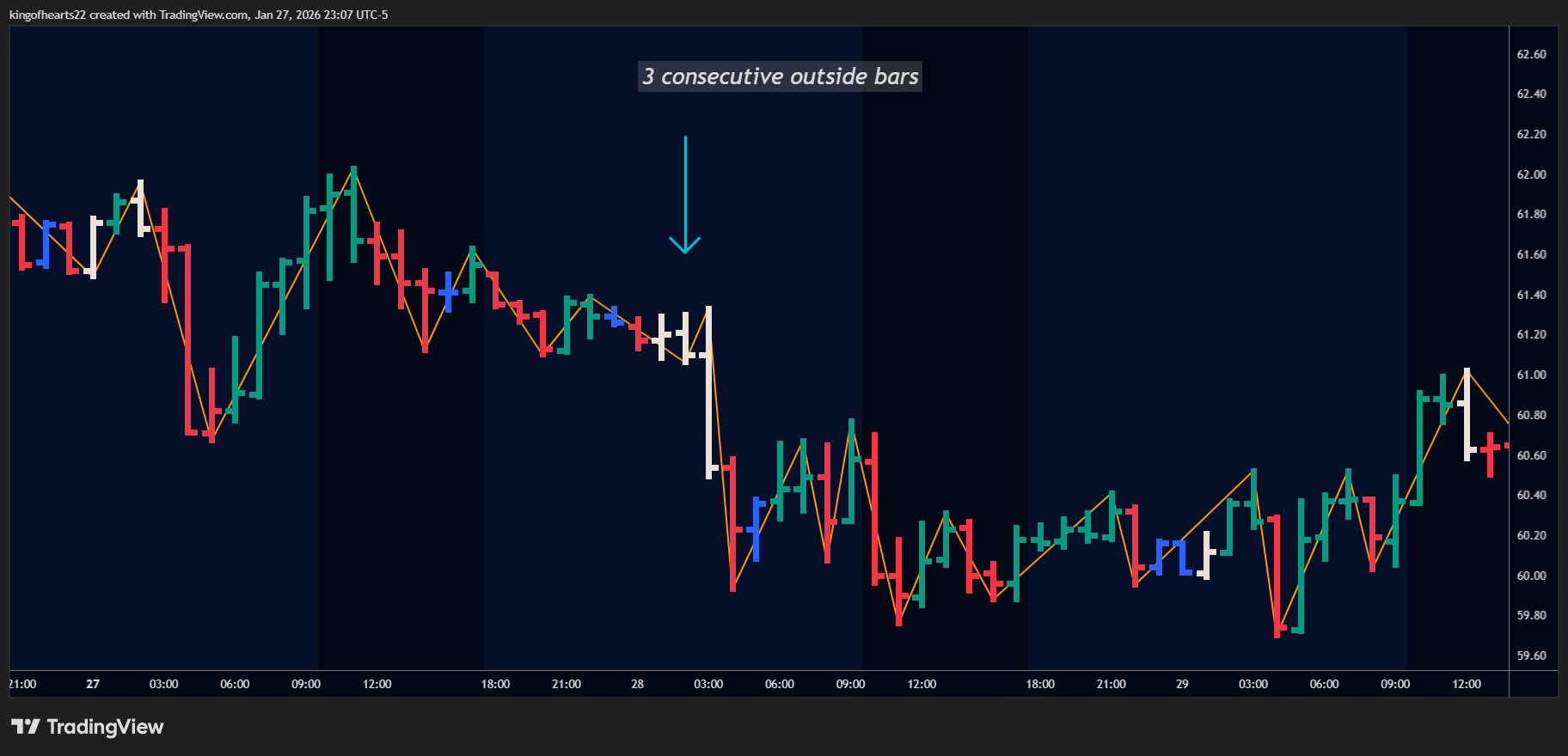 Consecutive outside bars expand the pending range until resolution.
Summary
Outside bars represent compressed zigzag movements:
- Mark as Continuation: Shows the zigzag explicitly (safest)
- Mark as Reversal: Places swings at OB extremes when safe (intelligent)
- Skip Entirely: Omits intermediate swings (cleanest)
Engulfing mode extends this logic to large-range bars that contain multiple subsequent bars, waiting for penetration before updating the swing.
Both features ensure the swing chart handles complex bar patterns accurately while giving you control over how much detail appears on your chart.