
Real-Time Swing Data
CSV export gives you historical data on demand. Webhooks give you live data as it happens.
When a swing completes, SSI PRO can automatically send structured JSON to any webhook-compatible endpoint — your database, trading system, or automation platform. No manual exports, no delays.
How It Works
┌──────────────┐     ┌──────────────┐     ┌──────────────────────┐
│  TradingView │     │   Webhook    │     │  Your Database or    │
│    Chart     │────▶│   Endpoint   │────▶│  Automation System   │
└──────────────┘     └──────────────┘     └──────────────────────┘

1. Swing completes    2. JSON sent via     3. Endpoint receives
   on chart              HTTP POST            and processes
The indicator detects a completed swing, formats the data as JSON, and fires a TradingView alert. TradingView sends that alert payload to your configured webhook URL.
Enabling Webhook Output
Setting Name: Enable JSON Webhook
Location: Alerts section
Default: Off
When enabled:
- Swing completion alerts send JSON payloads instead of plain text
- All human-readable alerts are disabled (Overbalance, Outside Bar, S/R Proximity)
- Only the JSON webhook fires through the alert system
Note: This is mutually exclusive with human-readable alerts. If you need both webhook data AND human-readable notifications, add the indicator to your chart twice — one instance with JSON Webhook enabled (for database), one with it disabled (for notifications).
Tip: For the notifications-only instance, disable visual elements to keep your chart clean:
- Set "Show Swing Lines" to OFF
- Set "Show Range Labels" to OFF
- The indicator runs invisibly as a dedicated alert engine
You still need to create a TradingView alert and configure the webhook URL — this setting controls the alert content format.
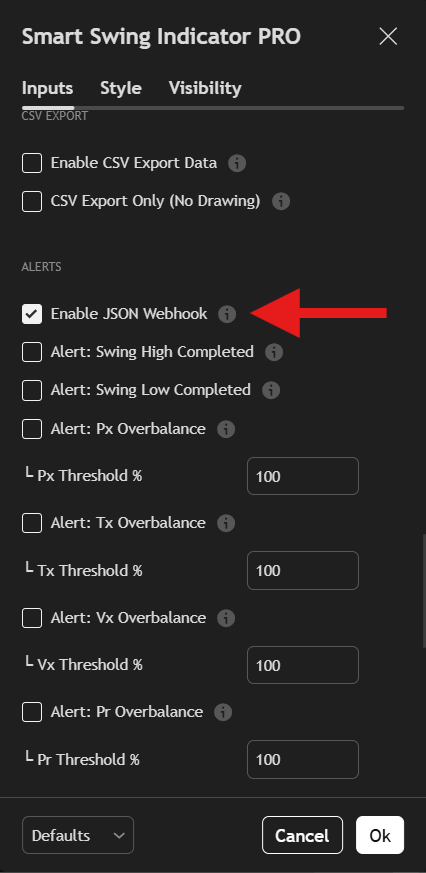 Enable JSON Webhook to receive structured data.
JSON Payload Structure
Each webhook sends a single JSON object:
{
  "symbol": "ES",
  "timeframe": 1440,
  "period": 1,
  "type": 1,
  "price": 4525.75,
  "extreme_ts": 1731801600000,
  "confirm_ts": 1731888000000,
  "pattern": 0
}
Field Definitions
| Field | Type | Description |
|---|---|---|
symbol | String | Instrument root symbol (e.g., "ES", "SI", "AAPL") |
timeframe | Integer | Chart timeframe in minutes (1440 = Daily) |
period | Integer | Swing period setting (1, 2, 3, etc.) |
type | Integer | Swing direction: 1 = High, -1 = Low |
price | Float | Price at the swing extreme |
extreme_ts | Integer | Unix timestamp (ms) when extreme formed |
confirm_ts | Integer | Unix timestamp (ms) when swing confirmed |
pattern | Integer | Formation pattern code (0-5) |
Pattern Codes
| Code | Pattern |
|---|---|
| 0 | Regular reversal |
| 1 | OB Reversal |
| 2 | OB Continuation |
| 3 | False OB |
| 4 | Engulfing Reversal |
| 5 | Engulfing Continuation |
Symbol Normalization
The symbol field uses syminfo.root, which strips exchange prefixes and contract notation:
| Chart Shows | Webhook Sends |
|---|---|
COMEX:SI1! | SI |
CME_MINI:ES1! | ES |
NASDAQ:AAPL | AAPL |
This ensures consistency across exports and simplifies database matching.
Setting Up the Alert
- Enable the setting: Turn on "Enable JSON Webhook" in indicator settings
- Create alert: Right-click chart → Create Alert
- Select condition: Choose SSI PRO swing completion
- Configure webhook:
- In Alert Actions, enable "Webhook URL"
- Enter your endpoint URL
- Set alert options: Name, expiration, frequency
- Create: Save the alert
The alert will fire once per completed swing, sending the JSON payload to your endpoint.
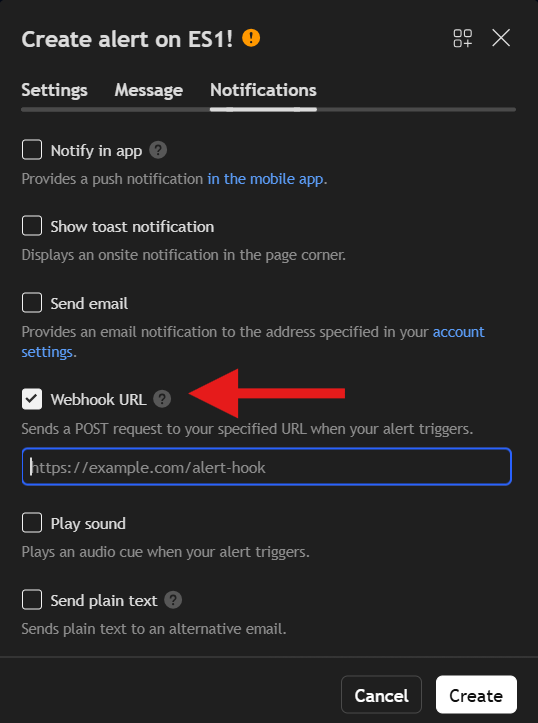 Configure your webhook URL in the alert settings.
Receiving Webhooks
Your endpoint receives an HTTP POST request with:
- Content-Type: application/json
- Body: The JSON payload
Endpoint Requirements
Your webhook endpoint must:
- Accept POST requests
- Return HTTP 200 on success
- Process the JSON body
TradingView retries failed webhooks, so design your endpoint to handle duplicates gracefully.
Database Integration
Supabase Edge Function Example
import { serve } from "https://deno.land/std@0.168.0/http/server.ts"
import { createClient } from 'https://esm.sh/@supabase/supabase-js@2'

serve(async (req) => {
  const supabase = createClient(
    Deno.env.get('SUPABASE_URL'),
    Deno.env.get('SUPABASE_SERVICE_ROLE_KEY')
  )

  const payload = await req.json()

  const { error } = await supabase
    .from('swings')
    .insert({
      symbol: payload.symbol,
      timeframe_minutes: payload.timeframe,
      swing_period: payload.period,
      swing_type: payload.type,
      swing_price: payload.price,
      extreme_timestamp: payload.extreme_ts,
      confirm_timestamp: payload.confirm_ts,
      pattern: payload.pattern
    })

  if (error) {
    return new Response(JSON.stringify({ error: error.message }), {
      status: 400
    })
  }

  return new Response(JSON.stringify({ success: true }), {
    status: 200
  })
})
Node.js/Express Example
const express = require('express');
const app = express();

app.use(express.json());

app.post('/webhook/swing', async (req, res) => {
  const { symbol, timeframe, period, type, price, extreme_ts, confirm_ts, pattern } = req.body;

  // Insert into your database
  await db.query(`
    INSERT INTO swings (symbol, timeframe_minutes, swing_period, swing_type,
                        swing_price, extreme_timestamp, confirm_timestamp, pattern)
    VALUES ($1, $2, $3, $4, $5, $6, $7, $8)
    ON CONFLICT DO NOTHING
  `, [symbol, timeframe, period, type, price, extreme_ts, confirm_ts, pattern]);

  res.status(200).json({ success: true });
});

app.listen(3000);
Deduplication
Use a unique constraint to prevent duplicate entries:
UNIQUE(symbol, timeframe_minutes, swing_period, extreme_timestamp, swing_type)This allows the same webhook to be received multiple times (network retries, alert re-fires) without creating duplicate records.
Multi-Instrument Setup
To track swings across multiple instruments:
- Add SSI PRO to each chart
- Enable JSON Webhook on each instance
- Create a webhook alert for each chart
- Point all alerts to the same endpoint
Your database differentiates records by the symbol field.
Multi-Timeframe Setup
To track multiple timeframes for one instrument:
- Open the instrument on Daily, Weekly, and Monthly charts
- Add SSI PRO to each chart
- Create webhook alerts for each
- All point to the same endpoint
Your database differentiates by the timeframe field.
CSV vs Webhook: When to Use Each
| Use Case | Recommended |
|---|---|
| Initial database population | CSV Export |
| Ongoing real-time updates | Webhook |
| Historical analysis | CSV Export |
| Automated trading systems | Webhook |
| Periodic full refresh | CSV Export |
| Live monitoring dashboard | Webhook |
Best practice: Use CSV export to populate your initial database, then webhooks to keep it current. Periodic CSV reconciliation can catch any missed webhooks.
Troubleshooting
Webhook Not Firing
- Verify "Enable JSON Webhook" is ON in indicator settings
- Check that the TradingView alert is active (not expired)
- Confirm the alert condition is set to swing completion
- Test your endpoint independently
Duplicate Records
Implement the unique constraint in your database. Webhooks may fire multiple times due to:
- TradingView retries on failed delivery
- Alert configuration issues
- Network timeouts with successful delivery
Missing Swings
Webhooks only fire for new swings after the alert was created. For historical data, use CSV export.
Symbol Mismatch
Ensure your database uses the root symbol (ES, SI, AAPL) not the full TradingView notation (ES1!, COMEX:SI1!).
Summary
Webhooks provide real-time swing data delivery:
- JSON payload with complete swing information
- Automatic firing on each swing completion
- Direct integration with databases and automation systems
- Combine with CSV export for complete coverage
Enable the setting, create a TradingView alert with your webhook URL, and your endpoint receives structured swing data as it happens.